Access hidden tabs in Waterfox - Waterfox Support
Please update your version of Waterfox for the latest features and security updates.
How do I know if I have hidden tabs?
When you hide a tab for the first time using an extension, Waterfox will alert you. From here, you can keep the tab hidden or unhide it and disable the extension.
Clicking  will also show you what tabs you have hidden.
How do I access my hidden tabs?
Access your hidden tabs by clicking the icon on the toolbar.

How do I find a hidden tab that is playing audio?
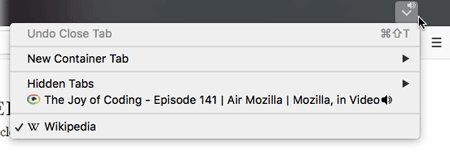
When a hidden tab is playing sound, the speaker icon will show up on the hidden tab icon  . If you click on the icon, the audio indicator will also show which hidden tab from the list is playing audio.
Copyright and Licensing
Modified from Access hidden tabs in Firefox . Original by Mozilla Contributors . Licensed under the CC BY-SA 3.0 .