Use bookmark folders to organize your bookmarks - Waterfox Support
This article describes how to organize your bookmarks with bookmark folders.
- For more information on using bookmarks, see Bookmarks in Waterfox .
Making new folders
- Click the Library button on your toolbar. (If you don’t see it, click the menu button, then click Library.) Click Bookmarks and then click the Show All Bookmarks bar at the bottom.
- Right-click
on the folder which will contain the new folder, then select New Folder…
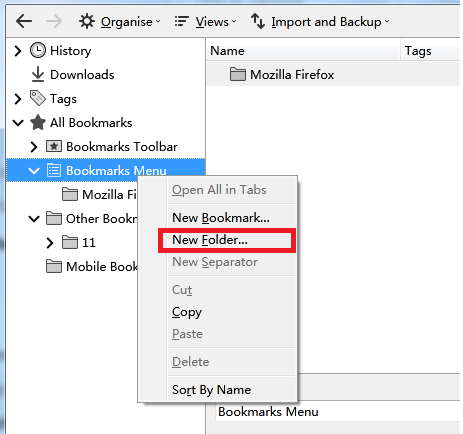
- In the New Folder window, type a name and (optionally) a description for the folder you want to create.
Putting bookmarks into folders
- Click the Library button on your toolbar. (If you don’t see it, click the menu button, then click Library.) Click Bookmarks and then click the Show All Bookmarks bar at the bottom.
- Click on the folder that holds the bookmark you want to move.
- Drag the bookmark over the folder you want it moved to. Release the button to move the bookmark into the folder.
Sorting folders
For instructions on how to sort your bookmarks folders, see Sort your bookmarks to quickly find the ones you want .
Copyright and Licensing
Modified from Use bookmark folders to organize your bookmarks . Original by Mozilla Contributors . Licensed under the CC BY-SA 3.0 .