Remove websites from the address bar suggestions - Waterfox Support
When you start typing into the address bar, Waterfox displays a drop-down list of suggested sites. This article describes how to clear single items or all items from the address bar history.
- To control what suggestions are shown when you type into the address bar, see Address bar autocomplete suggestions in Waterfox and Search suggestions in Waterfox .
Info
Clicking on the address bar displays a drop-down of Shortcuts (most visited sites) by default. See Customize your Shortcuts to learn more.
Clear a single item from the address bar history
This works for both browsing history and search history entries.
- Type or paste enough text for Waterfox to show the item in the drop-down.
- Press the ↓ down arrow key to highlight the item.
- Hold down the Shift key and press Delete on your keyboard.
Clear all items for a single site
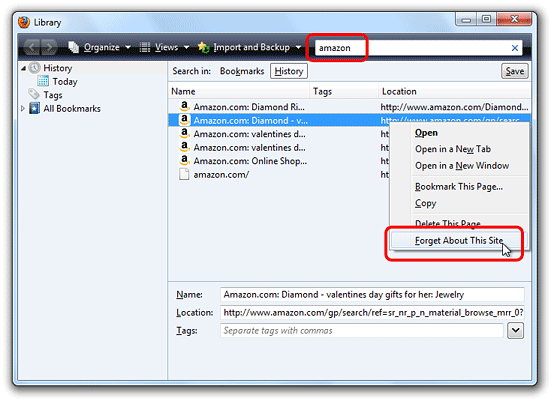
- Click the menu button to open the menu panel. Click History and then click the Manage History bar at the bottom to open the Library window.
- In the top right corner, type the name of the website you wish to forget in the Search History field, and press Enter.
- Right-click
on the site you wish to forget in the resulting list and select Forget About This Site.
 :::note Using Forget About This Site will remove all traces of that site from your history. For
more information, see Delete browsing, search and download history on
Waterfox . :::
:::note Using Forget About This Site will remove all traces of that site from your history. For
more information, see Delete browsing, search and download history on
Waterfox . ::: - Close the Library window.
Clear all items in the address bar history
Info
If you see items with a star, those are bookmarks and not part of your browsing history. This is part of the Waterfox address bar autocomplete feature. If you don’t want bookmarks or other content to appear in address bar suggestions, see Changing your address bar settings .
-
Click on the menu button and then click History.
-
Click Clear Recent History… to open the dialog window.
-
In the Clear Recent History window, set Time range to clear: to Everything.
-
To remove browsing history, make sure Browsing & Download History has a check mark next to it. To remove search history, check the box next to Form & Search History.
Tip
Be sure to remove the check mark next to any other items that you do not want to be cleared. See Delete browsing, search and download history on Waterfox for more information.
-
To clear all items in the address bar history, click OK.
Copyright and Licensing
Modified from Remove websites from the address bar suggestions . Original by Mozilla Contributors . Licensed under the CC BY-SA 3.0 .