Clear recent searches from the Search bar - Waterfox Support
Waterfox includes a Search bar on the New Tab page and an optional Search bar located to the right of the address bar. When you search the Web with Waterfox , the Search history can grow quite large over time. This article explains how to clear items from your Waterfox Search history.
- If you want to clear address bar search suggestions, see Remove websites from the address bar suggestions .
- If you want to clear search terms on websites, see Control whether Waterfox automatically fills in forms .
Clearing all search items
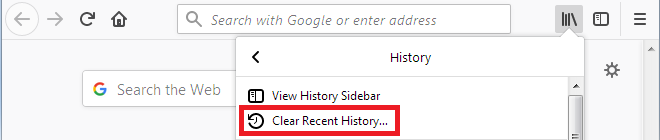
- Click the Library button , click History and select Clear Recent History… from the History menu.
- In the dialog box that opens, choose Everything from the Time range to clear: drop-down menu.
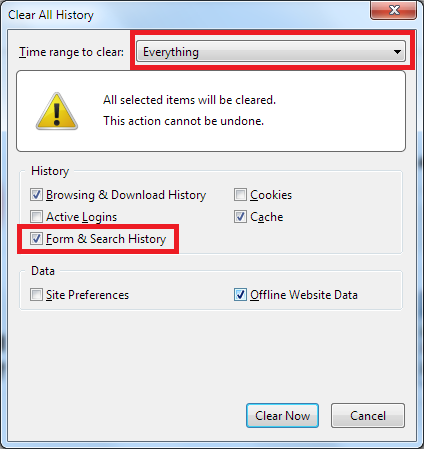
- Make sure that Form & Search History has a check mark next to it and remove check marks for any items you don’t want to clear.
- Click the Clear Now button to finish.
Clearing individual search items
To clear individual items from the Search bar history, click on the Search input field. Press the ↓ and ↑ keys to scroll the list of items. To delete the highlighted item, pressShift+Delete.
Copyright and Licensing
Modified from Clear recent searches from the Search bar . Original by Mozilla Contributors . Licensed under the CC BY-SA 3.0 .