Disable or remove Add-ons - Waterfox Support
Extensions and themes are types of add-ons for Waterfox. This article explains how you can disable or remove these add-ons.
Info
Waterfox includes OpenH264 and Google Widevine plugins, another type of add-on. To learn more, see Why is there an OpenH264 plugin in Waterfox? and Watch DRM content on Waterfox .
Disabling and removing extensions
Disabling extensions
Disabling an extension will turn it off without removing it.
- Click the menu button , click Add-ons and Themes and select Extensions.
- Scroll through the list of extensions.
- Click the blue toggle for the extension you wish to disable.

To re-enable the extension, find it in the list of extensions and click the toggle for the corresponding extension. The toggle turns blue when enabled.
To disable extensions that have changed your New Tab, New Window or home page, see An extension changed my New Tab page or home page .
Removing extensions
- Click the menu button , click Add-ons and Themes and select Extensions.
- Scroll through the list of extensions.
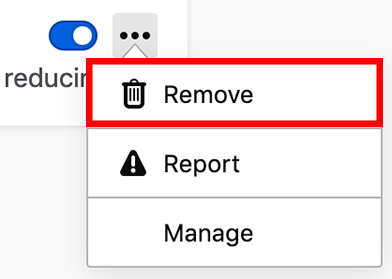
- Click the ellipsis (3-dot) icon for the extension you wish to remove and select Remove.
Disabling and removing themes
Waterfox comes with a Default theme and optional Light and Dark themes, but you can add new themes to Waterfox. For additional information, see Use themes to change the look of Waterfox .
Disabling themes
Click the menu button , click Add-ons and Themes and select Themes.
You will see one Enabled theme and a list of Disabled themes.
When the Enabled theme is not the Default theme, you can disable it by clicking Disable.
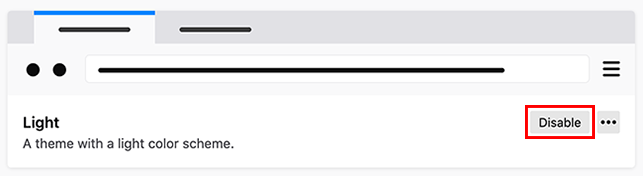
This will enable the Default theme.
Info
When the Enabled theme is the Default theme, it will become disabled when you enable another theme.
Removing themes
You cannot remove the Default, Light or Dark themes that come with Waterfox, but you can remove themes you’ve added to Waterfox. To remove an added theme:
- Click the menu button , click Add-ons and Themes and select Themes.
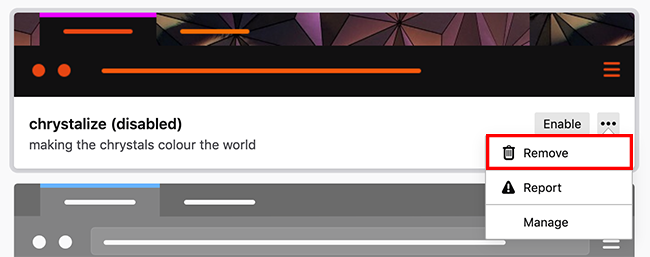
- Click the ellipsis (3-dot) icon that displays for the theme that you want to remove, and then select Remove.
Info
If you remove the Enabled theme, the Default theme will become enabled.
Troubleshooting
- If you are not able to remove an extension or a theme, see Cannot remove an add-on (extension or theme) .
- For help diagnosing problems caused by extensions and themes, see Troubleshoot extensions, themes and hardware acceleration issues to solve common Waterfox problems .
- See Troubleshooting add-ons for more help.
Copyright and Licensing
Modified from Disable or remove Add-ons . Original by Mozilla Contributors . Licensed under the CC BY-SA 3.0 .