How to set the home page - Waterfox Support
The New Tab page is the default home page that opens when you start Waterfox, click the Home icon  in the toolbar or open a new window. This article explains how to set your Waterfox home page.
- If you want Waterfox to open the windows and tabs from your previous session each time you start Waterfox, instead of opening your home page, see Configuring session restore .
Set or change your home page through the Home button
- Open the web page you want to use as your home page.
- Drag and drop that tab onto the Home icon on your toolbar.
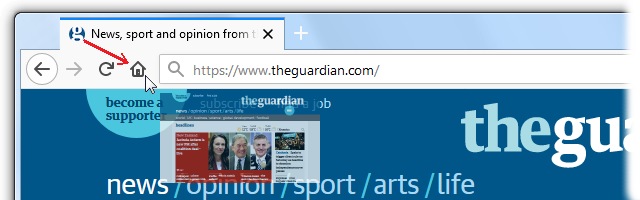
- Click Yes on the prompt to set this page as your home page.
Set your home page through Waterfox Settings
- Click the menu button and select Settings.
- Click the Home panel.
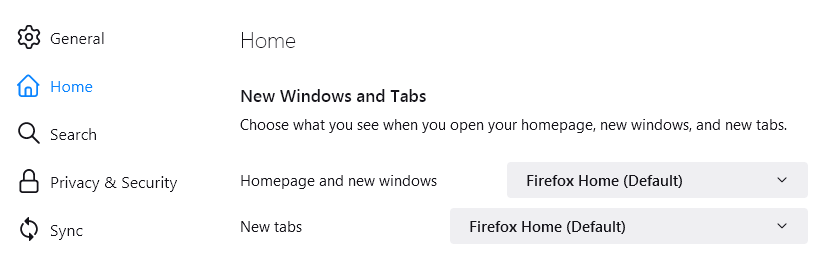
- Click the menu next to Homepage and new windows and choose to show the default Waterfox Home page, custom URLs or a blank page.
Set multiple pages as your home page
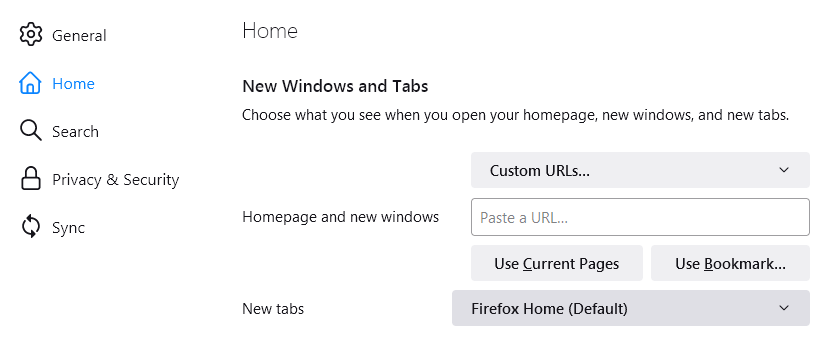
You can set a group of pages as your home page. Open each page in a separate tab, select Custom URLs… in the Homepage and new windows drop-down menu and click on Use Current Pages*.
 *
*
Having problems?
We have solutions:
-
If you keep getting the “Waterfox has just updated” tab every time Waterfox starts, see the article Waterfox says it’s just updated every time it starts - how to fix .
-
If your home page settings are not saved, see How to fix preferences that won’t save .
-
If you don’t see the Home button, have a look at Customize Waterfox controls, buttons and toolbars .
-
If your home page was hijacked or automatically changed, see Remove a toolbar that has taken over your Waterfox search or home page .
-
It’s possible the shortcut you are using to open Waterfox has a link in it. Right-click on the shortcut and check. See Wrong home page opens when I start Waterfox - How to fix for details.
-
An extension may be controlling your home page. For more information, see An extension changed my New Tab page or home page .
Copyright and Licensing
Modified from How to set the home page . Original by Mozilla Contributors . Licensed under the CC BY-SA 3.0 .