Turn picture-in-picture mode controls on and off - Waterfox Support
Info
This article applies to Waterfox version 72 and above.
The Picture-in-picture feature allows you to pop out videos from a web page and watch them in a floating window while you browse to other tabs.
If you don’t want to see the controls while hovering, you can hide that option in Waterfox. (Note: You can still turn on picture-in-picture view by right-clicking on a video.) Or you can use this to re-enable the control when you want to use it again.
- Click the menu button and select Settings.
- In the General panel, scroll down to the Browsing section.
- Clear the check mark for “Enable picture-in-picture video controls”.
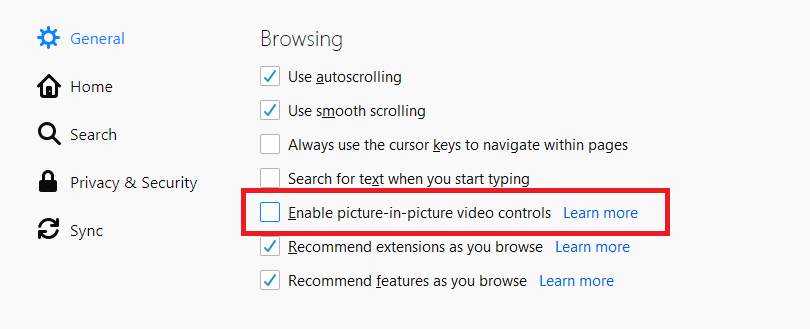
If you later want to re-enable the controls, simply add back the check mark.
Copyright and Licensing
Modified from Turn picture-in-picture mode controls on and off . Original by Mozilla Contributors . Licensed under the CC BY-SA 3.0 .