How to enable Windows SSO login in Waterfox - Waterfox Support
Windows single sign-on (SSO) is a new Waterfox feature that allows you to log in to Microsoft, work, and school accounts using credentials from your Windows 10 or 11 operating system. To enable it, click the Waterfox menu button, click Settings, select Privacy & Security on the left, go down to the Logins and Passwords section and check the box next to the Allow Windows single sign-on … setting.
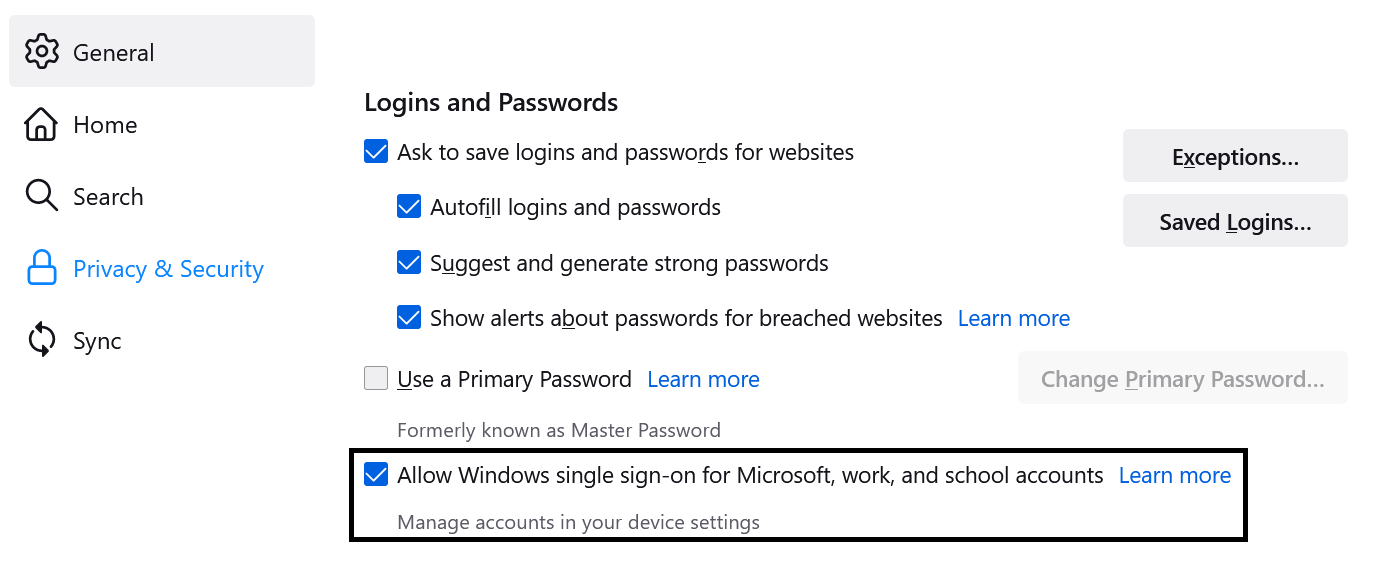
Info
This feature is available to Windows 10 and Windows 11 users starting in Waterfox version 91. It may be expanded to other Windows users in a future release.
To see if you have any accounts configured, enter accounts in the Windows taskbar search field, and click on Email & accounts. You’ll see a window that looks like this:

If you have accounts in the Accounts used by other apps section, Waterfox will use that information to log you in to Microsoft sites including Outlook and Office 365, as well as any work or school accounts that use Microsoft authentication.
Copyright and Licensing
Modified from How to enable Windows SSO login in Firefox. Original by Mozilla Contributors. Licensed under the CC BY-SA 3.0.