
Use tree tabs in Waterfox
Tree tabs in Waterfox arrange vertical tabs into parent and child branches. A tab opened from another tab can be tucked beneath it, and you can fold or move the whole branch together. Tree tabs are off by default.
Turn on tree tabs
- Click the Waterfox menu button and select Settings.
- Select Tabs and browsing.
- In Browser layout, find the Tree tabs section beneath Show sidebar.
- Turn on Show tabs as a tree.
Waterfox turns on Vertical tabs when you enable tree tabs because branches are only displayed in the vertical tab list. Turning tree tabs off does not turn vertical tabs off. To return to a horizontal tab bar, select Horizontal tabs separately in Browser layout.
If you select horizontal tabs while Show tabs as a tree remains on, Waterfox shows every tab in a flat strip and keeps the tree structure. The branches appear again when you return to vertical tabs. The horizontal tab bar position control is unavailable while vertical tabs are active. See Change the tab and toolbar layout in Waterfox for the related layout controls.
Work with tab branches
With tree tabs enabled:
- A parent tab with children has an arrow beside it. Click the arrow to fold or open its branch.
- Dragging a parent moves its descendants with it. Move a tab sideways while dragging to change its nesting level.
- With keyboard focus on a tab, press the Left Arrow key to fold an open branch or move to its parent. Press the Right Arrow key to open a folded branch or move to its first child.
- Right-click a single tab to use the available tree commands: Collapse Tree, Expand Tree, Close Tree, Close Children, Collapse All Trees and Expand All Trees. Waterfox only shows commands that apply to the selected tab and current tree state.
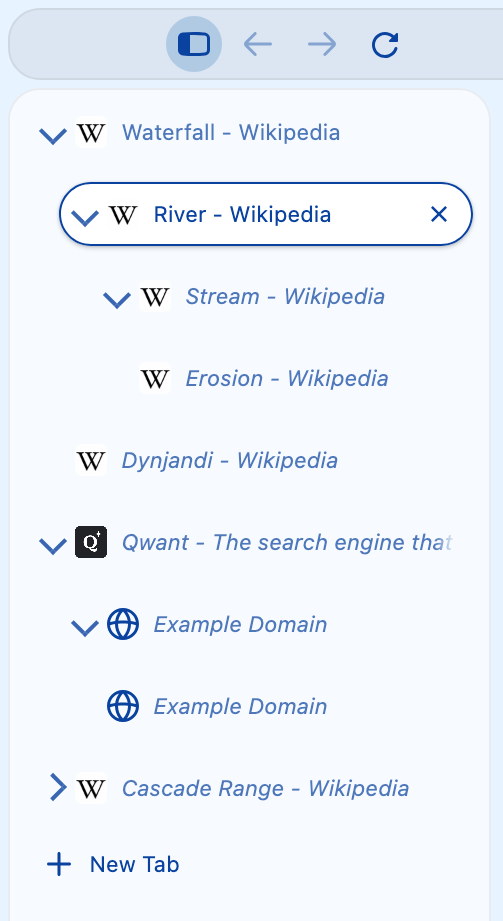
Pinned tabs stay outside the tree. If you pin a parent tab, Waterfox removes it from the branch and moves its children up to take its place.
Choose how Waterfox manages the tree
The remaining controls are in Settings > Tabs and browsing > Browser layout > Tree tabs. They are unavailable until Show tabs as a tree is on.
- Open new tabs controls where a newly opened tab joins the tree:
- On their own creates a top-level tab.
- Tucked under the tab that opened them makes it a child of its opener. This is the default.
- Next to the tab that opened them gives it the same parent as the current tab and places it after that tab.
- Open the active tab’s branch and fold the others away opens the selected tab’s root branch and folds other root branches when you select a tab. This is on by default and applies to user-initiated selections in the vertical tab list.
- Open a branch when a new tab joins it opens a folded parent when Waterfox attaches a new child. This is on by default.
- When you close a parent tab determines what happens to its children. The choices are to put the first child in the parent’s place, lift every child up one level, close the whole branch, or move the children to the top level. Waterfox lifts all children up one level by default.
- Double clicking a tab can fold or open its branch, close its branch, or do nothing. Folding or opening is the default.
- Keep the current tab in view when its branch is folded away leaves the active child visible. This is off by default. When it is off, folding a branch that contains the active tab selects the nearest visible ancestor.
- Mute a tab’s children along with it is on by default. When you mute a folded parent, Waterfox also mutes descendants hidden by that folded branch. When you unmute the parent, Waterfox only unmutes descendants that it muted automatically.
- Limit how deep tabs can nest offers depths from 2 through 6, or No limit. The default is No limit.
Practical caveats
- Tree relationships are stored with session data so Waterfox can restore the structure with your tabs.
- Close the whole branch only closes descendants while the tree is visible in vertical mode. If the same parent is closed from the flat horizontal strip, Waterfox keeps its descendants and lifts them up instead.
- A depth limit can prevent a new tab or dragged branch from nesting under the intended parent. In that case, Waterfox leaves it at an allowed level.